One system for the whole printing process.
The ATN Slicer is the backbone. Printer Farm runs everything on top.
First time around, the ATN Slicer and the AI tools get the part right — slice, check, simulate, print, diagnose, refine. Every order after that, the setup is proven and the farm runs it from the order to the delivery note.
Bring the part in and slice it the way you already do
STL, OBJ, 3MF or STEP — STEP converts right there in the browser. The ATN Slicer is OrcaSlicer with the Ask The Nozzle engine built in, so your profiles and settings come with you.
- Your own Orca profiles imported in one go
- A free Windows download, or the same engine in a browser tab on any plan
- Mid-air geometry detected as you slice
The failure is caught before you press print
Pre-flight reads the sliced result and lists what will go wrong — the wrong nozzle for the filament, a bed too cold, a layer too thick, a bridge nothing holds up.
- 40+ deterministic rules — material, nozzle, flow, temperature, cooling, adhesion
- One-click Apply puts the fix into the slicer (Hobbyist)
- 1 credit a check in the browser, from any slicer's gcode
See the warp and the hot spots before a gram is laid down
A reduced-FEA solver models the part cooling and contracting layer by layer and scores its warp and bed-lift risk. A thermal model walks the toolpath and heat-maps where layers stay too hot — or land too cool to bond.
- Warp scorecard with a 3D displacement view
- Per-layer heat-map with hotspots located in X/Y/Z, Z-bond risk flagged
- Runs on the local engine inside the slicer — no per-run credits
Print it once, with someone watching
Send the sliced job to a printer from the slicer — or, with the farm on top, into the pool for the first free printer that fits. Cameras and the AI watch the first print, so a failure is a photo, not a surprise.
- Send to Farm from the desktop slicer
- Live video and AI failure alerts while it runs (Workshop)
- A timelapse to look back over when it's done
A photo of the failure, the defect named, the settings to change
Diagnose looks at the print, not just the settings — then lands a list of exact setting changes with a reason for each. Ask answers anything at the bench, with follow-ups.
- Diagnose from photos and gcode: 20 credits
- Ask an expert anything: from 6 credits, with follow-ups
- Both panels live inside the slicer on Hobbyist and up
Apply the fix, save the revision — and the lesson sticks
The setting changes go into the slicer with one click and the part prints again. When it comes out right the setup is proven: save it back to the farm part as a new revision, G-code and all.
- One-click Apply on Hobbyist
- Your learning diary turns what you found into pre-flight rules for next time (Workshop)
- Each revision keeps its CAD, 3MF and G-code together with a preview
The order arrives on its own
Orders come in from WooCommerce, Shopify or your own website, and each line lands against a part on the farm — the same part, the same proven revision, every time.
- Shop connections poll on the schedule you set
- Orders from your own site or system over the REST API (Production)
- Every order shows what's covered, what's printing and what's gone
The shelf is used first
Stock on hand covers what it can before anything is printed. Only the shortfall goes to production, and every good print banks itself back into stock when it finishes.
- Four numbers always reconcile per line: ordered, covered, sent, still to go
- Spools and consumables tracked, with reorder points
- Cost per part from the filament and energy it actually used
A works order for the shortfall, with its traveller
The works order covers only what the shelf couldn't. It carries the bill of materials, the issue letter and the process steps, and prints as a traveller that follows the parts across the workshop.
- Queue the prints straight from the works order
- Re-issue from the BoM when the design moves on
- Good prints bank into stock and the order sees them as covered
The proven setup goes to the pool
The revision's G-code is already on the part, so the job is queued to the printer pool as it stands. Need it on a different printer or filament? The Cloud Slicer is the ATN Slicer engine in a browser tab, with your farm's printers and filaments already in it.
- Queue to the pool, or to one printer
- Slicing on your own PC, or on our servers with your PC off (Workshop)
- Send to Farm from the desktop slicer lands here too
The first free printer takes it — and waits for a clear bed
The farm sends each job to the first free compatible printer with the right filament loaded, then holds for your word that the bed is clear before the next one starts.
- Creality, Klipper, Bambu (LAN), FlashForge, OctoPrint, PrusaLink and Duet on one Board
- Cameras and AI failure alerts while it runs
- Maintenance forecast from your own printers' history
From the order arriving to the delivery note
Despatch raises the delivery note with courier and tracking, line by line. Part-shipped orders stay open and say so, and the four numbers on every line still add up.
- Delivery note with courier and tracking per line
- Part-shipped orders stay open and say so
- Cost per part from the filament and energy it actually used
Printer Farm
ATN Slicer
Your printers
Start with the slicer and use it on its own for as long as you like. The farm is there the day you start printing for other people — it uses the same engine, the same account and the same parts.
Slice, and the failure is caught before you press print
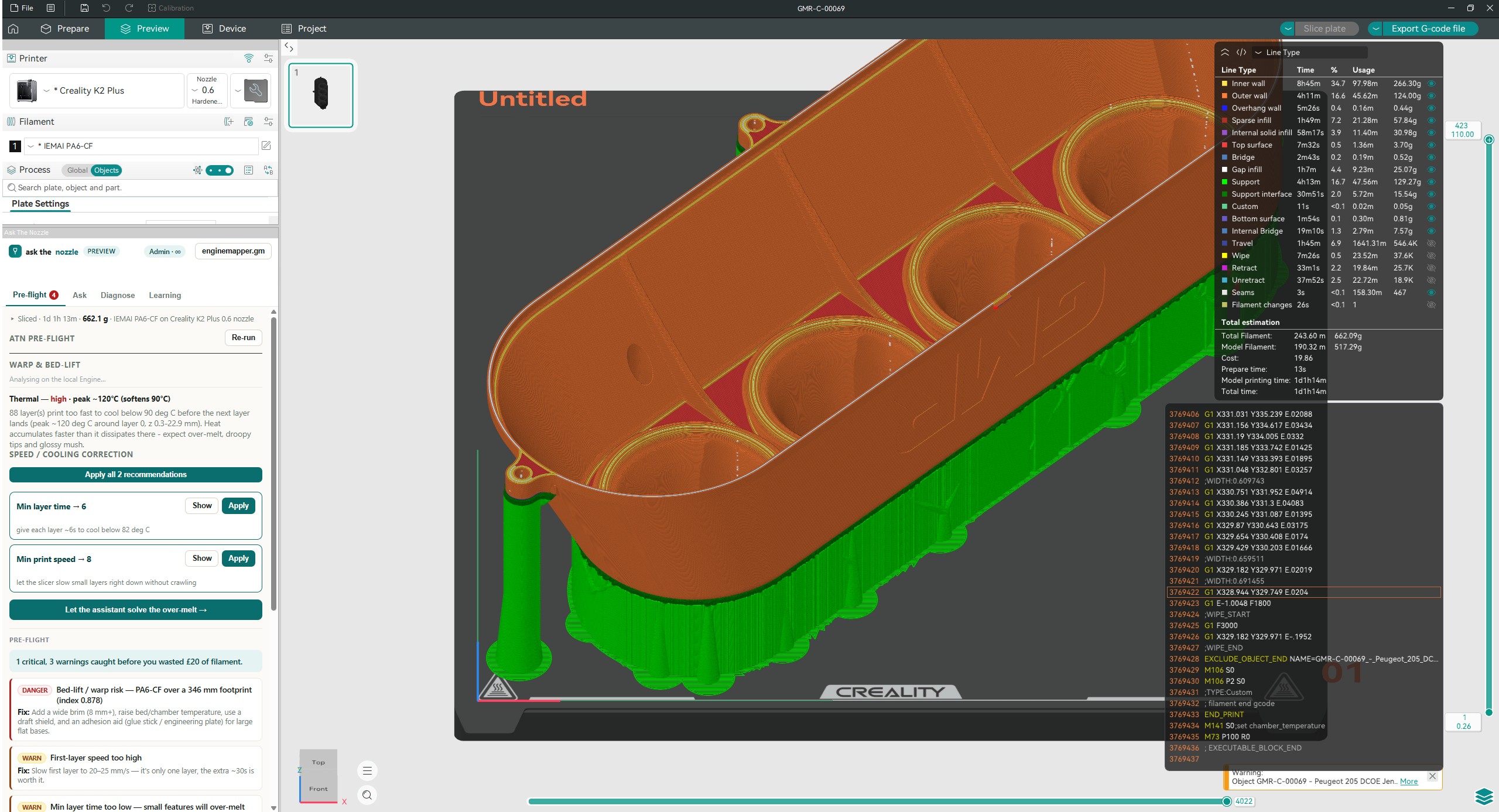
A fork of OrcaSlicer — every profile and setting you already use — with the Ask The Nozzle engine built in rather than bolted on. This is the layer every print goes through, whether you print one or run a farm.
Pre-flight, Diagnose and Ask, right beside the gcode preview
Slice as normal. The pre-flight panel reads the result and lists what will go wrong: a brass nozzle on an abrasive filament, a bed too cold for the material, a layer too thick for the nozzle, a bridge nothing holds up. On Hobbyist it applies the fix in one click and the Diagnose and Ask panels sit in the same window; on Workshop the thermal and warp analysis shows how the part will heat, cool and pull before any plastic is laid.
- Free download for Windows 10/11 — the full slicer, mid-air detection and support-fan control included
- Pre-flight is 1 credit a slice; see every finding, apply fixes and use the AI from Hobbyist
- Thermal heat-soak, warp FEA with a 3D displacement view and your learning diary on Workshop
Fix and learn without installing anything
The engine inside the slicer, as three tools on the web — for a print that failed on another slicer, a gcode file someone sent you, or a question at the bench. Each costs a fixed number of credits, and a new account starts with 30.
Ask
Conversational expert advice on anything 3D-printing — material choice, calibration plans, settings tuning, comparisons, design tradeoffs. Optional photo or gcode.
Pre-flight
Drop your gcode before you press print. The rule engine catches known-bad slicer-setting combinations — brass nozzle on abrasive material, PETG bed too cold, layer too thick for the nozzle.
Diagnose
Print failed? Upload photos and gcode. The AI identifies the defect from the photos, cross-references the knowledge base, and recommends concrete slicer setting changes you can download for any major slicer.
From web order to despatch — the job run around the slicer
When printing is the business, the slicer isn't the whole process: orders arrive, stock gets used, printers need feeding and boxes need labels. Printer Farm layers all of that on the same engine, and is honest about which steps are automatic and which are one click of yours.
- 01Order arrives from WooCommerce, Shopify or your own website.auto
- 02Stock first — the shelf is used before anything is made.auto
- 03Works order raised for exactly what's short, carrying the due date and the customer's reference.one click
- 04Cloud Slicer — the ATN engine in the browser, with your farm's printers and filaments already in it, pre-flight included.you
- 05The first free printer takes it, with the right filament loaded; the next job waits for your word that the bed is clear.auto
- 06Watched and counted — cameras and AI failure alerts, and every good print banks itself into stock.auto
- 07Despatch — quantities against the lines, courier and tracking, delivery note raised.one click
Creality K2 Plus and any Klipper machine, Bambu Lab in LAN mode, FlashForge, OctoPrint, PrusaLink and Duet, all on one Board. You need a Windows or Linux computer that stays on near the printers; a small agent runs there and keeps your files on your own machine.

One ladder, one account, both layers
Each tier unlocks the slicer and the AI tools, and the farm plan of the same name. Prices in GBP per month. The farm is in open beta — every new farm starts on a 14-day Workshop trial, free, no card.
- 900 credits a month
- One-click Apply, and the Diagnose and Ask panels inside the slicer
- 1 user · 5 GB
- Dashboard and the bed-clear queue
- Orders from your shop, works orders, delivery notes
- Parts, spools and cost per part
- Cloud Slicer slices on your own PC
- 3,000 credits a month
- Thermal heat-soak and warp FEA analysis, the 3D displacement view, your learning diary
- 3 users · 50 GB
- Everything in Hobbyist
- Slicing on our servers too, even with your PC off
- AI print monitoring and alerts
- Live video, timelapses, chat-ops
- Smart plugs and energy cost per job
- 6,000 credits a month
- Everything in Workshop
- 10 users · 250 GB
- Everything in Workshop
- Remote camera streaming, anywhere
- REST API and webhooks
- Priority support
Bigger fleet, single sign-on or a custom setup? Get in touch. Prices in GBP; Stripe converts to your local currency at checkout outside the UK. Plans and top-ups → · The farm's plans in detail →
Why this is the most advanced 3D-printing AI
What sets Ask The Nozzle apart from generic chatbots and rule-only lint tools — in the browser, in the slicer and on the farm.
Vision AI on your actual photos
Most "AI" 3D tools only read settings. We look at the print — identifying additive vs subtractive surface defects, distinguishing wet filament from nozzle drag, reading what your eyes see. The same eye watches the farm's cameras for spaghetti and failed first layers.
Curated knowledge base
Distilled from hundreds of community, vendor, and academic sources and thousands of real-world test cases — continuously reviewed and refined. Real-world, not hallucinated.
Conversational follow-ups
Most diagnosis tools are one-shot. Tried our suggested fix? Send a new photo. Got worse? Tell us. Every case becomes a thread that learns as you iterate.
Actionable setting recommendations
Every diagnosis lands as a clean list of concrete setting changes — exact key, current value, recommended value, and a one-line reason for each. In the ATN Slicer they apply in one click; PrusaSlicer and OrcaSlicer users can download an importable .ini patch.
Pre-flight rule engine
Drop your gcode and instantly catch the most common slicer-setting mistakes before you waste a print. 40+ deterministic rules covering material/nozzle compatibility, volumetric flow, temperatures, cooling, adhesion and more — for one credit, in the browser or on every slice.
Your data, your call
Every diagnosis and conversation is saved to your private history so you can re-read it, continue the chat, or download a settings patch later. Delete any case — or your entire history in one click — from the History page. On the farm, your part files stay on your own computer.