A 3D print farm scales on systems, not on how many printers you own. The operators who turn a shelf of machines into a reliable production line don’t win by buying the most hardware — they win by locking their slicer profiles, building a queue that routes jobs to the right machine, keeping filament dry, and servicing printers before they fail. Buy printers when orders demand it; everything else is workflow. This is how to run a 3D print farm that actually ships parts, not one that generates a pile of failed prints at 6pm every day.
The short version: validate demand with one printer, cost your parts so they cover the real spend, then add capacity against confirmed orders. The sections below walk through the operational layers in the order you should build them — standardisation first, then monitoring, queueing, recovery and maintenance.
Start with standardisation, not with more printers
Before you scale anything, lock down what makes a good part repeatable. The two biggest sources of “mystery failures” in a farm are inconsistent profiles and inconsistent filament. Fix both and most of your downtime disappears.
Treat slicer profiles like firmware. Pick a baseline profile per material and nozzle size, then version it. When you change a retraction value or a flow ratio, it’s a new revision with a note — not an edit someone forgot about. Every brand and material family spawns its own profile, so sprawl is the enemy. Our OrcaSlicer first-layer settings guide gives you concrete numbers to anchor the first-layer part of that baseline.
Group printers by purpose. Even a “mixed” farm gets more repeatable when machines fall into groups: same nozzle size, same material family, same hardware state. Run your PLA/PETG machines as one pool and your enclosed ABS/ASA/CF machines as another. This makes job routing trivial and means printer #1 and printer #12 behave the same.
Build order for the operation itself:
- Write baseline SOPs and lock the profile library.
- Add monitoring you can actually act on.
- Add queueing and material-aware routing.
- Design for recovery — what happens when a job fails at 3am.
You don’t need all of it on day one. Build automation in layers.
Filament is a controlled input, not a consumable you grab
Moisture and inconsistent spools are silent batch killers. A wet spool of PETG doesn’t announce itself — it just stipples the surface and weakens layer bonds across a 14-hour job you only inspect in the morning.
- Store spools sealed; label the open date.
- For hygroscopic materials (PA, PETG, TPU, PC), use a dry box or a drying routine. The storage target often quoted for hygroscopic filaments is below 10% relative humidity — verify against your own hygrometer rather than trusting the desiccant colour alone.
- Keep “production spools” physically separate from experimental ones.
- Never start a long job on a mystery spool.
Spool tracking matters commercially too: if grams aren’t deducted as prints run, your cost per part is a guess. That’s one reason farm software that tracks measured filament consumption earns its place.
The queue is the engine: matching, not listing
A spreadsheet lists jobs. A real queue matches them. It checks maximum print size, hotend and bed temperatures, and tags such as nozzle size, material and colour, so a job only ever lands on an eligible printer. That single behaviour removes the most common operator error: sending a 0.4mm PLA job to a machine loaded with 0.6mm CF.
Good queueing also means treating a batch as one line. Set a quantity of 270 and it counts down as one entry — not 270 jobs you have to babysit individually.
Route by constraint, in roughly this priority:
- Material — minimise changeovers; keep a machine on one filament as long as the queue allows.
- Risk — put the gnarly geometry on your most dialled-in printer, not the flaky one.
- Post-processing — don’t schedule 20 support-heavy parts back-to-back if you’re the one removing supports.
- Machine strength — fast printers for big bulk jobs, your most precise machine for detail work.
Then stagger completion times. A farm that’s always printing can still under-deliver if everything finishes at once, parts sit on beds blocking the next job, and you spend the evening firefighting. A pre-flight check on every plate before it enters the queue stops bad G-code wasting a slot in the first place.
Continuous printing and bed clearing
Overnight running is where farms earn their margin, and it hinges on how the next job starts. Automated bed-clearing methods vary by setup: toolhead push-off, plate-changer mods, belt printers, robot arms, API-driven cycles, or a manual mode where you clear the plate by hand and mark the bed ready. The system then dispatches the next matching job from the queue.
Camera-based AI bed checks — confirming the plate is genuinely empty before the next print — are maturing but still beta across the tools that offer them. Until you trust it, a confirmed-clear-bed step keeps you honest: the queue waits for a human to say “clear” before firing the next job. That’s exactly how Printer Farm handles it — you confirm the bed and press Despatch, and the queue dispatches each job to the first free compatible printer with the right filament loaded.
Choosing printers for a farm
The market has moved from the old Prusa i3 MK3S+ and Ender 3 reliability-and-price pairing to enclosed CoreXY. The Bambu P1S has become the de-facto default for small-to-medium farms, and by reported counts the most common machine in new farms started in 2025–2026. The reason is per-unit setup time: automatic bed levelling, flow calibration and vibration compensation mean machine #1 and machine #20 produce the same part without you tuning each one.
| Option | Approx. unit cost | Fleet management | Best for | Watch out for |
|---|---|---|---|---|
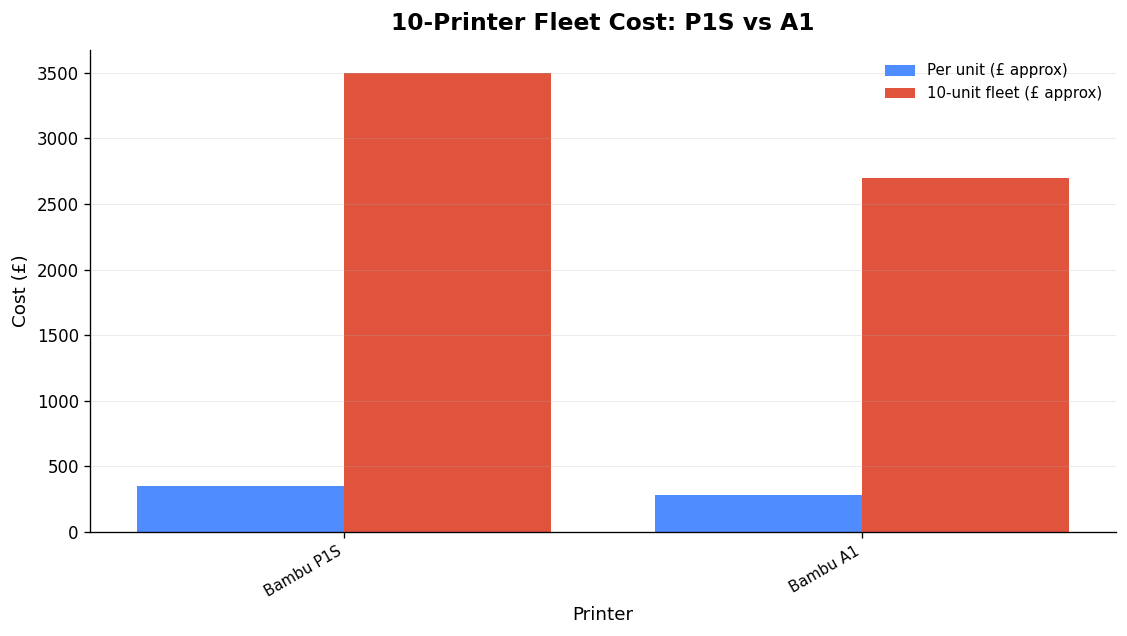
| Bambu P1S | ~£350 (~$450) | Bambu ecosystem; LAN mode for local control | PLA/PETG/ASA bulk, repeatability | Closed ecosystem, 256mm build, cloud convenience vs LAN |
| Bambu A1 | ~£280 (~$350) | Bambu ecosystem | Budget PLA/PETG at the same print quality | Open bedslinger — not for high-temp/CF |
| Creality K1/K1C | Varies | None built-in — needs OctoPrint/Obico per printer | Klipper flexibility, open API | Mixed reliability reports across units |
| Enclosed CoreXY (350mm, Klipper) | Varies | Moonraker API, Mainsail/Fluidd | Engineering polymers (PA-CF, PC) | More hands-on setup |
A worked example: ten P1S units land around £3,500 (~$4,500); ten A1s around £2,700 (~$3,500), with the same print quality on PLA and PETG. The A1 saves roughly £80 a unit but gives up the enclosure.
Match the machine to the polymer, not just the budget. A 420mm open bedslinger is excellent for PLA props and a poor match for a large PA-CF component. A smaller 350mm enclosed CoreXY controls chamber temperature and is far more useful for engineering polymers — the kind of parts covered in our write-up on 3D-printed wind-tunnel parts. Note the X1C was discontinued on 2026-03-31 (refurbished units remain available), succeeded by the X2D.
Farm management software: what each tool actually does
Pick software by integration, not by feature-list length. The hard constraint is which printers it can genuinely drive.
- Moonraker (Klipper) is the stable, documented API. Anything can talk to it, and it exposes the full set: live status, upload, start, remote file inventory, raw G-code and measured filament consumption. If you want open integration, build the farm around Klipper machines.
- Bambu’s local protocol is unofficial, and since the authorisation control system arrived, the printer checks whether a command came from Bambu’s own software before acting. LAN mode works, but expect narrower, beta-level capability through third-party tools.
- Bambu Farm Manager is free and good at what it does: local visibility of every printer, status and active job. It is monitoring and control, not workflow automation — no job queue, no material-aware routing, no order integration, no cloud access.
- OctoFarm is effectively dead. Its last stable release was October 2022 and the project asked for new maintainers in 2023. It is OctoPrint-only, needs a Raspberry Pi per printer, and its architecture is fundamentally single-printer. Don’t build a new farm on it.
- Mainsail/Fluidd give you Klipper web control through Moonraker; several tools layer multi-printer overview, queueing and central management on top.
Printer Farm sits on this map as an end-to-end layer: Moonraker is the stable provider (full capability), with PrusaLink, OctoPrint, Bambu LAN and Elegoo Centauri in beta at narrower capability. It works with Creality and any Klipper/Moonraker printer, Bambu Lab in LAN mode, FlashForge, OctoPrint, PrusaLink and Duet. A small agent on a computer that stays on (Windows or Linux) bridges the printers; your files stay on your own machine and slicing runs on your PC through ATN Slicer. It also pulls shop orders — WooCommerce in one click with a read-only key, Shopify, or your own custom website connected through the farm’s shop API (a token, no plugin) — matches them to part numbers by SKU, and raises a works order for exactly the shortfall.
Maintenance is the uptime lever
Most “broken” printers aren’t broken — they’re under-maintained. The vendor claim is that twenty minutes of routine care per month prevents 80% of failures; even discounting the exact figure, structured maintenance programmes are credited with cutting downtime by up to half. Run four cadences:
- Daily: a glance at the fleet dashboard.
- Weekly: wash the build plate, vacuum fan debris, listen for new noises, and do the belt “twang” test (weekly or every 40–50 print hours).
- Runtime-triggered: service based on print hours, filament used or failure count.
- On-demand: fix what breaks.
Monthly, wipe rails, re-lube leadscrews, check belt tension and update firmware. Crucially, when a printer enters maintenance it should drop out of queue matching automatically, so the system never hands it a job it can’t finish. And if you’ve changed a nozzle or disturbed the hotend, revisit first-layer behaviour — don’t assume nothing moved.
Nozzle and hotend wear — the numbers
| Nozzle | Life on PLA/PETG | Life on abrasives (CF, GITD, wood, metal-filled) | Cost |
|---|---|---|---|
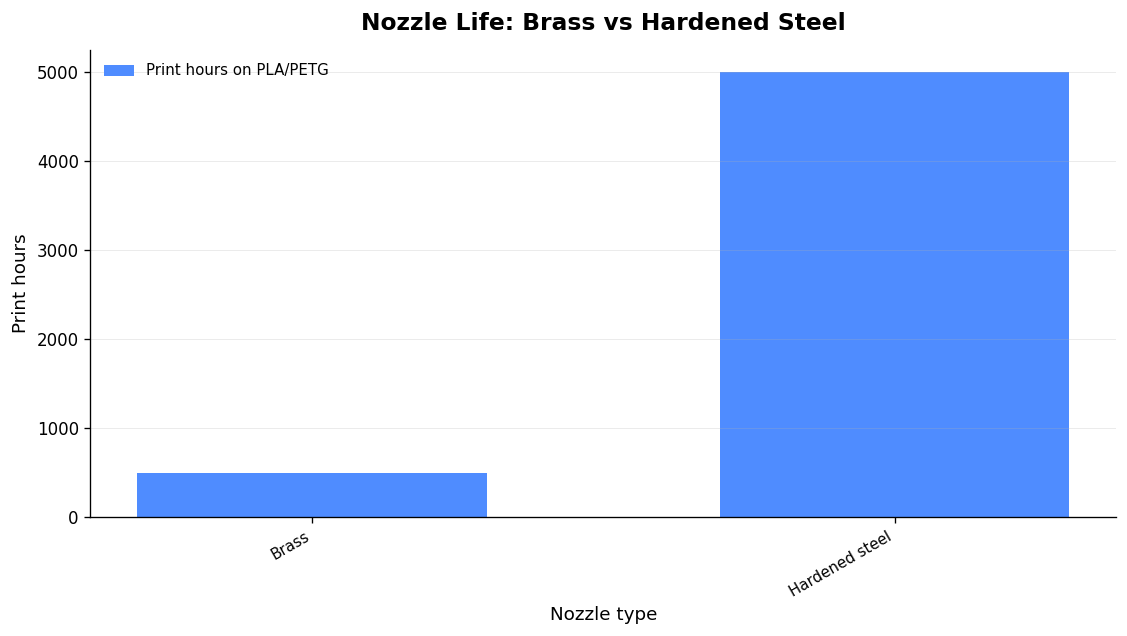
| Brass (V6/CHT/E3D) | ~200–500 h (swap around 500 h) | 10–50 h — destroyed fast | ~£1–3 ($1–3) |
| Hardened steel | 5000+ h | Use for all abrasives | ~£7–12 ($8–15) |
The failure mode is gradual: the circular orifice wears into an oval and the effective diameter grows, so flow and dimensional accuracy drift before anything looks obviously wrong. Any machine printing carbon-fibre, glow-in-the-dark, wood- or metal-filled material should be on hardened steel from day one.
Costing, orders and the production line
A farm only makes money if cost per part is real, not estimated. That means measured filament deducted as prints run, machine time and failures accounted for, and mixed plates split by weight. Tie that to a works-order flow — stock used first, one click to raise a works order for exactly the shortfall carrying the due date and customer reference — and you have a production line rather than a hobby at scale. For how usage-based tooling is billed, see our explainer on credit pricing, and for the broader shift this enables, this piece on 3D printing as a real manufacturing method.
When a print fails mid-run, catching it early is pure margin. Camera-based AI failure detection with alerts, plus a photo-based diagnosis workflow when you do find a defect, keeps a single bad job from eating a spool and a bed slot overnight.
FAQ
How many printers do you need to call it a farm?
There’s no magic number — a farm is defined by running printers in parallel as a production system, not by a count. Validate demand and dial in your systems on one machine; two or three well-managed, standardised printers outproduce ten chaotic ones.
Are Bambu printers the best choice for a print farm?
For PLA/PETG/ASA bulk work at speed and repeatability, the P1S is the default for a reason — self-calibration cuts per-unit setup. But the ecosystem is closed, remote management leans on the cloud, and the build volume is 256mm. For open integration or large engineering polymers, an enclosed Klipper/Moonraker CoreXY is often the better tool.
What’s the single biggest cause of farm downtime?
Under-maintenance and uncontrolled filament. Wet spools and worn brass nozzles cause failures that look like “mystery” defects. A monthly service routine and a dry, labelled production-spool system prevent the majority of them.
Can I run a farm without my files going to the cloud?
Yes. With Printer Farm, a small agent runs on a computer you keep on (Windows or Linux), your files stay on your own machine, and slicing runs on your PC through ATN Slicer. There’s a free 14-day Workshop trial, no card.
Related: 3D Printer Fleet Management Software: How to Choose a Tool That Actually Runs the Job