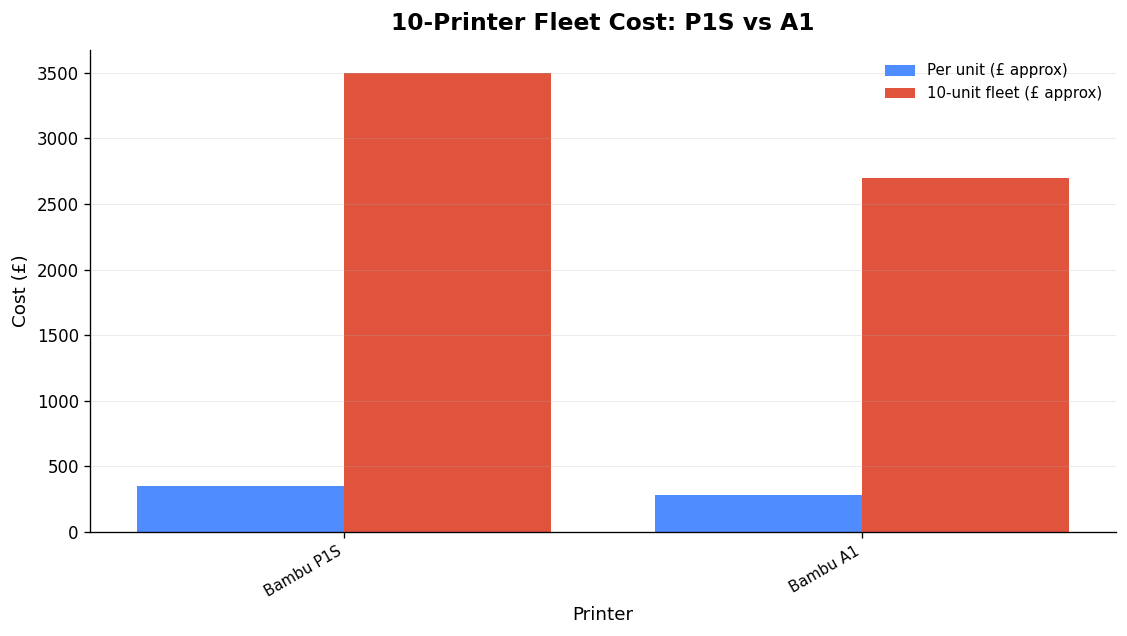
Start with one printer, not twenty. A 3D print farm is a group of printers run in parallel as a business, so one operator produces far more than a single machine ever could — but the printers are the easy part. The real farm begins when pricing, material, a shared queue and deadlines all need one process that holds together. If you want to know how to start a 3D print farm without burning cash on hardware you can’t keep busy, the sequence below is the one that works: validate demand on a single machine, learn your true failure rate and per-order labour time, then add printers only when each one can pay for itself.
That discipline matters because the number that kills most attempts isn’t gross margin — it’s net margin after you pay yourself. One widely shared operator post-mortem ran a printing business for eight months, took $3,666 in revenue and netted roughly 8% before quitting, concluding it was “a job, not a business” because the human time per order never shrank. Everything here is aimed at avoiding exactly that outcome.
Step 1: Pick a niche before you buy anything
Profitability hinges on consistent demand, not on owning printers. Printing generic trinkets and desk toys puts you in a race to the bottom on price against everyone else with a Bambu Lab printer. The farms that last serve underserved niches: replacement parts for specialised machinery, custom components for communities like car modding and motorsport, props and cosplay, jigs and fixtures for other small manufacturers, or short-run engineering prototypes.
There’s a direct link between niche and economics. Around four to six well-utilised printers can clear roughly $10,000 per month on consumer products. But go up-market into business prototyping at $100 or more per design-hour and three machines can match that, because you’re selling expertise and turnaround, not grams of filament. Decide which game you’re playing first — it changes every decision after it.
Step 2: Validate on one printer
A single machine is your research tool. Use it to confirm people will actually pay for your product, to measure your real failure rate on the materials you’ll sell in, and — the critical one — to time how many minutes of human attention each order consumes from slice to packed box. That per-order labour figure is what you’ll multiply by every printer you add, so measure it honestly.
Before a long job commits filament and hours, it pays to catch the preventable failures up front. Run plates through a G-code pre-flight checklist, and when a print does fail, feed a photo into a vision-based diagnosis tool rather than guessing — our defect-by-defect guide walks through reading the symptoms. A farm lives or dies on first-time-right rates; fix that on one printer before you multiply the problem.
Step 3: Choose printers that suit a fleet
Fleet printers are chosen for reliability, repairability and cost-per-hour, not peak headline features. Three sensible routes dominate 2026 farms:
- Bambu Lab, for throughput and low entry cost. The A1 and P-series are the most common choice in new farms. They’re fast and reliable, with a free Bambu Farm Manager that groups multiple units onto one screen on Windows. The trade-off is openness: Bambu machines run “mostly closed”, and in LAN mode they’ll accept uploads and start prints but expose no file inventory to third-party tools.
- Prusa, for uptime and dimensional accuracy. The MK4S is simple, easy to fix and prints with exceptional accuracy. Downtime costs money, and it almost never goes down — Josef Prusa runs one of the world’s largest farms (1,000+ machines) on this lineage.
- Klipper/Moonraker machines (Creality K1 series, etc.), for open control. Open platform means any filament, any slicer and any management software, with a hardened nozzle option for abrasive filaments like PA-CF.
| Printer | Build volume (mm) | From (USD) | Openness |
|---|---|---|---|
| Bambu Lab A1 Mini | 180 × 180 × 180 | $219 | Mostly closed |
| Bambu Lab A1 | 256 × 256 × 256 | $299 | Mostly closed |
| Bambu Lab P2S | 256 × 256 × 256 | $549 | Mostly closed |
| QIDI Q2 | 270 × 270 × 256 | $499 | Mostly open |
| Creality K1 Max | 300 × 300 × 300 | $549 | Mostly open (Klipper) |
| Snapmaker U1 | 270 × 270 × 270 | $749 | Mostly open |
| Prusa MK4S (kit / assembled) | 250 × 210 × 220 | $709 / $999 | Open |
| Prusa XL (1 / 5 toolheads) | 360 × 360 × 360 | $2,299 / $3,899 | Open |
| Bambu Lab H2C | 330 × 320 × 325 | ~$2,399 | Mostly closed |
Prices move fast — treat these as a starting point and verify at purchase. For zero-waste multi-material work, the toolchanging Prusa XL and hotend-swapping Bambu H2C lead; for a single-material production line, cheaper single-head machines win on cost-per-part. A mixed fleet is normal and nothing to avoid — just plan your software around it from the start.
Step 4: Plan workspace, power and ventilation
Allow more space than you think. A rule of thumb is roughly 0.4 m² (about 4 sq ft) per printer on shelving, plus dedicated areas for post-processing, packing and filament storage. Heavy-duty wire shelving is the standard: sturdy, good airflow, easy to reconfigure. Mount printers between waist and chest height so you can see and reach the build plate, and don’t stack so high you can’t.
Power is where farms trip up — literally. Each printer draws 200–500 W, but the dangerous moment is simultaneous bed heat-up, which can briefly demand over 2000 W across a handful of machines and trip a breaker mid-print, scrapping every job on that circuit. The fixes:
- Split the fleet across at least two circuits and stagger bed heat-up rather than firing them all at once.
- Never run six printers off one power strip on a single ring. In the UK, consult a qualified electrician about dedicated circuits — don’t guess at ring-main loading.
- Fit surge protection. One spike can kill several machines at once.
- Choose a spot with real airflow. FDM printers release fumes and particulates; ventilate, especially with ABS/ASA.
Step 5: Software — stop babysitting past three printers
Remote monitoring stops being optional past three machines, because nobody can watch that many at once. First-party apps (Bambu Handy, Bambu Farm Manager) cover start/stop and camera views. For deeper, open control, Klipper via Moonraker with Mainsail or Fluidd adds fast motion control and queue management; OctoPrint with OctoFarm gives one dashboard across many machines; Obico adds AI failure detection for Klipper and OctoPrint. There are good free multi-brand dispatchers too — FDM Monster connects OctoPrint, Moonraker, Bambu and PrusaLink into a shared queue.
Each does its job well. The honest limitation is that most of these stop at monitoring and dispatch — they watch printers; they don’t run the business around them. (One caution if you self-host: print-farm-manager ships with no built-in authentication and serves your printer API keys to anyone who can reach the server, so keep it on a trusted LAN only.) For choosing between the ecosystems, see our breakdown of fleet management software and our comparison of seven farm tools.
Step 6: Build the order-to-despatch pipeline
The goal of every workflow decision is to minimise human minutes per print: slice once, dispatch to the first free machine, monitor remotely, clear the bed, repeat. Spring steel PEI sheets that flex to release parts are the cheap manual equivalent of automated ejection. But the labour sink in most farms isn’t the printing — it’s everything around it: matching web orders to part numbers, raising works orders for the shortfall, costing each part, and keeping track of which spool went where.
This is exactly where Printer Farm is built to run the whole job end to end rather than just watch the machines. A web order from WooCommerce, Shopify or your own custom website (connected through the farm’s shop API — a token, no plugin) pulls in every 10 minutes and matches to part numbers by SKU. Stock is used first; one click raises a works order for exactly the shortfall, carrying the due date and customer reference. Cloud slicing in the browser uses the real OrcaSlicer engine — or plates arrive as revisions from ATN Slicer. The queue dispatches each job to the first free compatible printer with the right filament loaded; camera-based AI failure detection watches it and alerts you. Good prints bank into stock with a true cost per part (mixed plates split by weight), spools are deducted gram by gram, and despatch raises a numbered delivery note. You confirm the bed is clear and press Despatch; the rest is automatic.
It works with Creality and any Klipper/Moonraker printer, Bambu Lab in LAN mode, FlashForge, OctoPrint, PrusaLink and Duet — so a mixed fleet is fine. It needs a small agent on a Windows or Linux computer that stays on; your files stay on your own machine, and slicing runs on your PC through ATN Slicer (or on our servers on Workshop and above). It’s in open beta with a free 14-day Workshop trial, no card: start the trial. For the thinking behind running a farm as a production line, read the systems, not the shopping list.
Step 7: Scale only when the maths says so
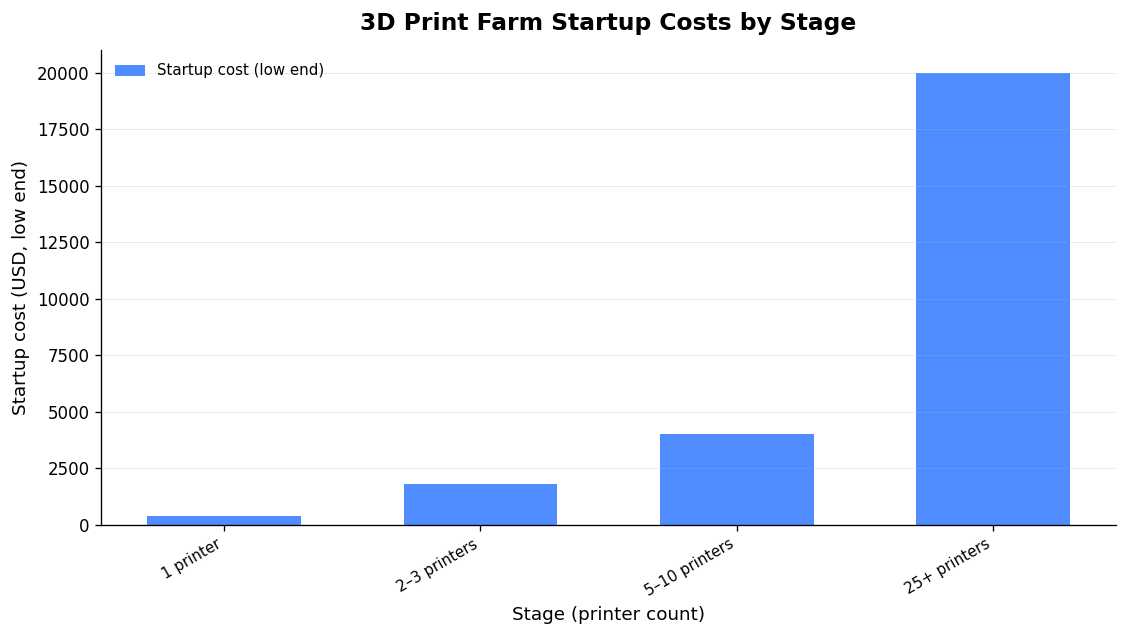
Don’t buy 20 printers on day one. Begin with 2–3 dependable machines, perfect the workflow and build a customer base, then add slowly. The rule that keeps you solvent: each new printer should pay for itself within 2–3 months from the revenue it generates. A farm earns on machine hours, so utilisation — not printer count — is the metric to obsess over. An idle printer is just a shelf that cost you money.
| Stage | Printers | Typical startup cost (USD) | Purpose |
|---|---|---|---|
| Validate | 1 | $400–$900 | Prove demand, measure failure rate & labour per order |
| First fleet | 2–3 | $1,800–$2,800 | Build workflow and customer base |
| Small farm | 5–10 | $4,000–$10,000 | Reach ~$10k/mo on consumer products if well utilised |
| Production | 25+ | $20,000+ | Volume manufacturing; systems must already be solid |
On margins: 40–60% operating margins and 30–70% gross margins are commonly cited and achievable on the materials side. The gap between those numbers and your take-home is your own labour — which is why squeezing minutes out of each order (Step 6) is what actually makes the business work.
Frequently asked questions
How many printers do I need to start a 3D print farm?
Start with one to validate, then move to 2–3 dependable machines to build your workflow. Around 4–6 well-utilised printers can clear roughly $10,000 per month on consumer products; three can match that on prototyping work at $100+ per design-hour. Utilisation matters more than count.
How much power does a 3D print farm draw?
Each printer draws 200–500 W in normal running, but simultaneous bed heat-up across several machines can briefly spike over 2000 W and trip a breaker. Split the fleet across at least two circuits, stagger heat-up, fit surge protection, and in the UK have an electrician assess your ring main.
What software should I use to manage a print farm?
Below three printers, first-party apps are fine. Past that, use Klipper/Moonraker with Mainsail or Fluidd, OctoPrint with OctoFarm, or Bambu Farm Manager for a Bambu-only fleet. To run orders, works orders, costing and despatch — not just monitoring — Printer Farm handles the whole pipeline across a mixed fleet.
Is a 3D print farm actually profitable?
It can be, but net margin after paying yourself is where many attempts fail. Choose a niche with real demand, keep failure rates low, and ruthlessly cut the human minutes per order. The farms that work sell expertise, turnaround or a defensible niche — not grams of generic filament.