The two things that genuinely hold a stock K2 Plus back are CFS feeding reliability and the flow ceiling — and the highest-return K2 Plus upgrades cost nothing. The machine runs a Klipper-based firmware fork, so pressure advance and input shaping are already there to be dialled in. Get those right, fix the Bowden-tube retention fault before it eats a cutter, and only then spend money on a higher-flow hotend. That order matters: swap the nozzle first and you’ll just be printing fast with uncalibrated resonance compensation.
Below is the realistic upgrade path for the K2 Plus and K2 Plus Combo, grounded in the actual hardware. For reference, the base machine is a 350 × 350 × 350 mm enclosed CoreXY with a direct-drive Apus all-metal extruder, a 350 °C hotend, a 120 °C bed and an actively heated chamber to 60 °C. It runs step-servo motors with 32,768 microsteps per revolution, a rated 600 mm/s at up to 30,000 mm/s² acceleration, and ships with Creality Print 5.0. Everything here is about getting that envelope to actually hold under load.
Start with the free firmware tuning
Because the K2 Plus runs a Klipper-based firmware, input shaping and pressure advance are built in. These are the two most impactful changes you can make and neither costs a penny.
Pressure advance controls how much the extruder leads and trails nozzle pressure during acceleration and deceleration. Get it wrong and you see bulging corners and thin, starved seams at the start of each perimeter. Input shaping cancels the resonant frequencies that cause ringing — the ghost echoes you see after a sharp feature. On a machine rated for 600 mm/s and 30,000 mm/s², uncalibrated resonance compensation is the single biggest reason stock prints look worse than the spec promises.
The K2 Plus has a toolhead AI camera that fine-tunes the PA value and flow rate, which does some of this work for you, but it is not a substitute for a proper resonance calibration. The one rule to remember: re-run input-shaping calibration after any toolhead change. A new hotend changes the moving mass, which shifts the resonant frequencies, which invalidates your old shaper settings. If you’re unsure whether a defect is a calibration problem or a hardware problem, photograph it and run it through Diagnose — it reads the defect and hands back concrete slicer changes rather than leaving you to guess.
Fix the Bowden-tube retention fault before it costs you
This is not a performance upgrade — it’s a design fault worth fixing early. On the K2 Plus the short PTFE tube between the filament path and the extruder sits in a connector that doesn’t hold well. The tube rotates in the connector, particularly during Y moves, and that repeated movement works the connection loose until the tube pops out mid-print.
Worse, the tube holder relies on small steel plates to retain the tube. Lose one and the tube no longer holds at all — and the loose metal plate can be picked up by the cutter magnet, where it will eventually jam the cutter. So a dropped retainer plate becomes two faults, not one.
There are two levels of fix:
- Immediate: replace the Bowden tube connector.
- Long-term: print a bracket that supports the tube and takes the stress off the connection. A common approach installs a PC4-M6 or PC4-M10 fitting in the threaded hole as the retaining mechanism.
One caveat with the printed route: with the PC4-M6 fitting you’ll usually need to remove the lid, because the tube doesn’t feed through the fitting and sits quite high, intersecting the lid. And one honestly-flagged risk from the community: because the Bowden tube does not pass all the way through some retainers, filament may not feed into the extruder reliably 100% of the time. Test on a short print before you trust it with a 12-hour job.
While you’re in there: the extruder itself
The stock extruder is a dual-gear drive with a 6.25:1 ratio delivering around 80 N of extrusion force, with a built-in filament-break sensor on the back cover. It’s compact at 47 × 40 × 23.5 mm. The replacement kit is cross-compatible with K2, K2 Pro and K2 Plus — but the filament-break sensor module itself is K2 Plus only, so don’t assume a K2 spare brings the sensor with it.
Hotend upgrades: lift the flow ceiling
The stock 350 °C hotend is capable, but if you’re pushing speed or printing wide layers in PETG, ASA or carbon-filled nylon, flow is the limiter. Two sensible options exist, and they are not equivalent.
| Spec | Creality Ceramic Heating Block (K2 Plus) | Micro Swiss FlowTech (K2 Plus) |
|---|---|---|
| Max temperature | 350 °C | 350 °C |
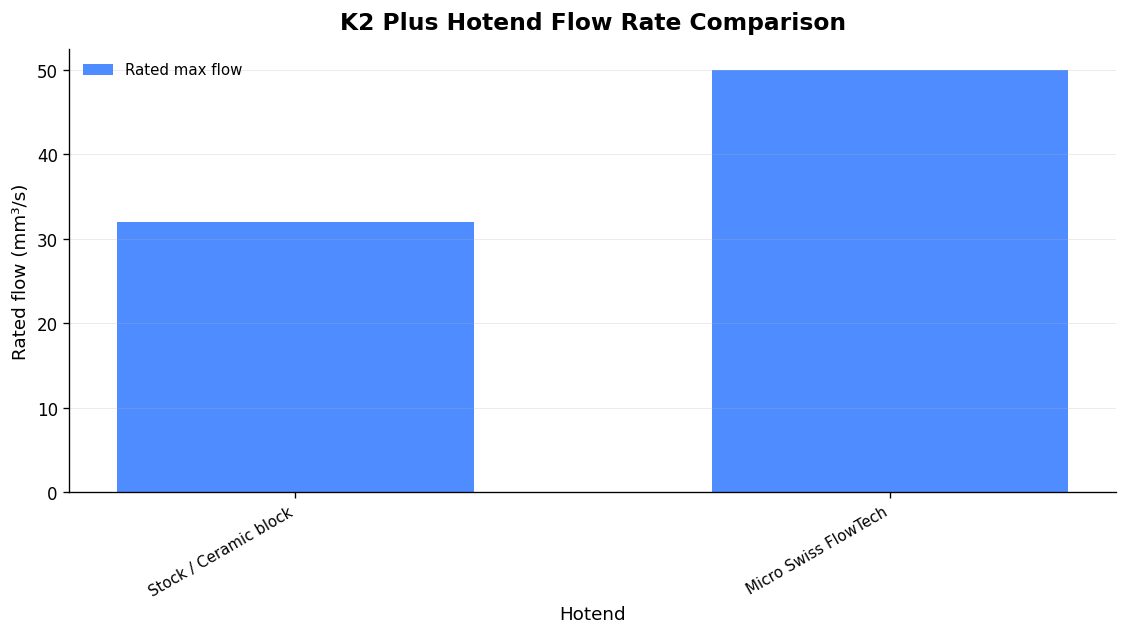
| Rated flow | Up to 32 mm³/s | Up to 50 mm³/s (theoretical, CHT nozzle) |
| Heating | 360° surround ceramic, 100 W | Bondtech CHT core, longer 28.6 mm melt zone |
| Nozzle | 0.4 mm quick-swap “Unicorn” | CM2 CHT 0.4 mm |
| Cold nozzle changes | No | Yes (integrated nozzle/heatbreak) |
| Correct part / fitment | K2 Plus block only (350 °C) | M3111 for K2 Plus (M3115 = K2/K2 Pro, 300 °C) |
| Firmware changes | None | None (matched thermistor configs) |
The Creality ceramic block uses a 360° surround ceramic heater for more even heating and faster heat transfer, with an enlarged chamber, smooth inner walls (inner-hole roughness Ra < 0.4) to resist blockages, and a quoted flow of up to 32 mm³/s at 600 mm/s. Critically, the K2 Plus block is rated 350 °C while the K2/K2 Pro ceramic block is rated 300 °C — the kits are not interchangeable on temperature. Buy the wrong one and you lose the high-temperature headroom you’re paying for.
The Micro Swiss FlowTech uses Bondtech CHT technology for a quoted 50 mm³/s, a leak-proof all-metal design, a 350 °C ceiling and a 28.6 mm melt zone — longer than typical, giving filament more time to reach temperature before extrusion. The integrated nozzle and heatbreak allow cold nozzle changes, so you’re not heat-soaking the block just to swap a worn nozzle. Because the K2, K2 Pro and K2 Plus share matched thermistor configurations, no firmware changes are needed — but you must order the right part: M3111 for the K2 Plus (the M3115 is the 300 °C K2/K2 Pro core).
Be realistic about the headline number. The 50 mm³/s is the CHT nozzle’s maximum theoretical volumetric capability, not a guaranteed real-world rate on the K2 Plus. Your actual sustained flow depends on filament, temperature and the extruder keeping up. Treat it as more headroom, not a promise.
CFS reliability: the upgrades that stop mis-feeds
With one CFS the K2 Plus Combo prints up to four colours, scaling to 16 colours across four units. The recurring problem isn’t the AMS logic — it’s feeding. Filament exits the CFS but doesn’t reach the extruder, and you get a “filament might be tangled” warning alongside FR2833 (feed issue) or FR2832 (retract issue). Most of these faults come down to path friction, sharp bends and wet filament.
The fixes that actually move the needle:
- Replace the PTFE tubes with Capricorn and remove sharp bends in the path. Lower friction means fewer feed failures on long multi-colour jobs.
- Add an inline filter to keep dust out of the path.
- Print CFS risers and mounts to improve the feed angle and add anti-slip footing — this alone reduces mis-feeds on multi-colour prints.
- Keep the desiccant fresh. Watch the humidity indicator: green is fine, orange is slightly high, red means replace or regenerate the desiccant. Wet filament aggravates feed jams as well as hurting surface quality.
A hard safety warning on the desiccant: the packets that ship with the CFS are not microwave-safe — one user microwaved them and had two puddles of melted plastic twenty seconds later. Coloured desiccants also burn easily; anything over 120 °C can burn the additives and reduce effectiveness. Regenerate in a low oven at a controlled temperature, not the microwave.
For flexibles, don’t fight it: the “no flexibles” guidance refers specifically to the CFS multi-material path, which struggles to feed soft filament along its long route. Load TPU directly into the extruder, not through the CFS, and slow your retractions.
If humidity is your main battle, there are community sealing and drybox mods — including the Ice992 “K2 Plus CFS Mod – Heated Chamber – Space Pi Double” on Printables, which drops a Creality Space Pi Double heater inside the CFS shell. One user reports a passive desiccant approach brought the CFS to roughly 17% humidity; it’s slower to dehumidify than a heated drybox and needs constant power, but it doesn’t overheat the filament and uses far less electricity. Those humidity figures are individual anecdotes, not manufacturer-verified numbers — treat them as a direction of travel, not a spec.
Rooting the firmware: powerful, but know the risk
Creality OS on the K2 is a locked-down Klipper fork built on a slimmed-down OpenWRT base — no SSH and no editable printer.cfg out of the box. The K2 Plus also differs from the K1: a completely different filesystem, service manager and firmware update path, Fluidd pre-installed at port 4408, and no /usr/data/ path. The Guilouz Helper Script that K1 owners rely on does not support the K2.
The real path is the k2-improvements project (jamincollins is the widely cited upstream) plus Mainsail-K2 or Fluidd-K2, which roots the machine and gives full Moonraker and Entware access with a modern web UI (community ports expose Fluidd and Mainsail on 4408/4409). Default access is already there: on the touchscreen go to Settings → Root account information, where root is enabled, then connect over SSH as user root with password creality_2024 — note it’s creality_2024, not the creality_2023 used on the K1 series. Root SSH access must be re-enabled after every factory reset.
The honest warning: rooting works on K2 / K2 SE / K2 Plus and costs nothing, but it voids the warranty and carries a real brick risk. Don’t flash unofficial firmware on a machine with a proprietary CFS and bed-levelling probe unless the community build is mature and well documented — an unofficial flash can break the exact features you rely on. If all you actually want is remote access, monitoring, AI failure detection and notifications, OctoEverywhere gives you that for free without touching the firmware.
Cheap printed and accessory upgrades worth doing
- Build-plate quick clamps — secure the plate, prevent movement and are small enough to clear the hotend.
- HEPA + activated-carbon filter box (K1 Max/K2 series) to trap dust and odours in an enclosed machine printing ASA and similar.
- Side tool holders, screen covers, CFS slide latches, and a waste “poop chute” with a bin.
Running more than one K2 Plus?
If you’re printing to sell — Etsy and eBay makers, prop shops, prototyping bureaus — the upgrade that pays back fastest isn’t hardware, it’s not babysitting the fleet. Printer Farm (open beta) runs the whole job end to end: a web order from WooCommerce, Shopify or your own custom website (connected through the farm’s shop API — a token, no plugin) comes in, stock is used first, and one click raises a works order for exactly the shortfall. Plates are sliced in the browser on the real OrcaSlicer engine — on your own PC through ATN Slicer, or on our servers on Workshop and above — then the queue dispatches each job to the first free compatible printer with the right filament loaded. Cameras with AI failure alerts watch each print, good parts bank into stock with a true cost per part (mixed plates split by weight), and despatch raises a numbered delivery note.
It needs a small agent on a Windows or Linux computer that stays on; your files stay on your own machine. It works with Creality and any Klipper/Moonraker printer, so a rooted K2 Plus with Moonraker access slots straight in alongside Bambu Lab (LAN mode), FlashForge, OctoPrint, PrusaLink and Duet. There’s a free 14-day Workshop trial, no card.
FAQ
What’s the single best K2 Plus upgrade?
The free one: a proper input-shaping and pressure-advance calibration. On a machine rated for 600 mm/s, uncalibrated resonance compensation is the biggest reason stock prints disappoint. Re-run it after any toolhead change.
Is the Micro Swiss FlowTech or the Creality ceramic block better?
The FlowTech quotes a higher theoretical flow (50 vs 32 mm³/s) and allows cold nozzle changes; the Creality ceramic block is a simpler, well-matched 350 °C part with no cross-compatibility traps beyond ordering the K2 Plus version. For the FlowTech, order part M3111 for the K2 Plus — the M3115 is the 300 °C K2/K2 Pro core.
Why does my CFS keep throwing FR2833 or FR2832 errors?
Those are feed (FR2833) and retract (FR2832) faults, usually caused by path friction, sharp bends or wet filament. Swap the tubes for Capricorn, remove sharp bends, add an inline filter, print better-angled CFS mounts, and keep the desiccant fresh — replace or regenerate it once the indicator goes red.
Does rooting the K2 Plus void the warranty?
Yes, and it carries a real brick risk. The default root login is user root, password creality_2024. If you only want remote access and AI failure detection, OctoEverywhere does that for free without flashing anything.
Related: How to Fix Failed 3D Prints: A Defect-by-Defect Repair Guide
Related: First Layer Calibration Settings in OrcaSlicer: The Exact Values and Correct Order to Dial It In
Related: PETG First Layer Settings in OrcaSlicer: The Exact Values That Make It Stick (and Release Cleanly)