Order management for a print farm is the discipline of connecting the orders you have sold to the work your printers need to do — so at any moment you can see what is due, what is assigned, what is printing and what is ready to ship. It is a different job from fleet monitoring. Monitoring tells you a bed temperature and whether a print has detached. Order management tells you that the “Large Planter — White” a customer bought on Etsy maps to PLN-LG-IWHT, which maps to a production-ready file and process, and that it has to leave on Monday. Most tools stop at the production side. The money leaks between the storefront and the first layer.
Getting the order is the easy part. Knowing which file, colour, size and material the buyer actually meant — and knowing it before you commit two hours of machine time — is the hard part. This is the layer that should not depend on bouncing between a spreadsheet, an Etsy tab and a printer dashboard, and it is where 3d print farm order management earns its keep.
Why it breaks when sales pick up
A messy order workflow is perfectly manageable at low volume. You remember the backlog, you eyeball the queue, you retype each sale from Etsy or Shopify into a spreadsheet and guess it onto a printer by hand. It works right up until it doesn’t.
Then sales pick up, production gets harder to see, and the whole operation depends on whoever remembers the most. The concrete failure modes are always the same:
- Orders live in too many places — Etsy, notes, printer dashboards and your head — instead of one workflow.
- Manual retyping introduces errors. One transposed variant prints the wrong colour; one missed browser tab blows a ship-by date. You usually find out via a bad review rather than before dispatch.
- Admin steals print time. Logging into Etsy to download shipping info, copying the tracking number off a label and pasting it back to close the order — repeated per order — is time that should be spent printing and shipping.
The fix is not more willpower. It is a pipeline where each stage hands a clean, unambiguous instruction to the next.
The order-to-shipped-box workflow
A clean end-to-end flow for self-fulfilment runs like this:
- Storefront order arrives (Shopify, Etsy, WooCommerce, Squarespace or your own site).
- SKU maps to a production-ready file and print configuration.
- Print on the first free compatible printer.
- QC against a defined standard.
- Pack with the right packaging, insert and branding rules.
- Ship with tracking, and close the order.
Most bad setups fail between steps two and four. The storefront happily accepts an order, but the production side still has to infer which file, colour, size or material the buyer meant. If you sell the same product across more than one channel, there is one extra rule worth burning into your SOP: merge orders into a single production queue before you start printing, so priorities stay consistent and the Monday deadline on Etsy isn’t out-prioritised by a Shopify order with a week of slack.
SKU mapping is the backbone
If you take one thing from this article, take this: the platform you choose matters far less than your SKU discipline. SKU mapping is the core of reliable fulfilment, and it is where most farms are quietly sloppy.
A SKU should identify one sellable production definition — not encode its history. Keep the code short, unique, stable and readable. Store the full design revision, material, quantity and packing details in a separate SKU record.
| Put in the SKU code | Keep OUT of the code (store in the record) |
|---|---|
| A short, unique, stable identifier | Price |
| Enough to distinguish a sellable variant | Supplier |
| Readable by a human on a shelf | Shelf location |
| — | Printer / machine assignment |
| — | Current file revision |
The distinction to internalise: “Large Planter — White” is merchandising copy; PLN-LG-IWHT is the production key. The master record lives outside the code, so a SKU such as ORBIT-S-BLK-2 resolves to a design file and revision like orbit-s-r8.3mf. When a SKU retires, never overwrite history.
When to mint a new SKU — and when not to
Create a new SKU when the buyer or the production team must distinguish variants. Do not create one for a file cleanup, a slicer change, a machine reassignment or a compatible process improvement. Those are revisions of the same sellable thing.
- Mapped SKU, qty 1 → one rule, one output.
- Mapped SKU, qty 3 → all per-unit outputs ×3.
- Kit SKU → every component present and accounted for.
- Unknown / unmapped SKU → hold.
That last rule is the safety-critical one. An unmapped SKU is a stop condition, not a cue for an operator to pick a similarly named file. If no exact rule exists, the safe result is a hold — never a guess. Personalisation must not be able to mutate production from free text, and breaking product changes get a deliberate new SKU. Use the same SKU for the same physical product across every channel; it gives you one production rule and clean cross-channel reporting for free.
One source of truth per SKU: files and version control
The root cause of version confusion is simple: there is no single current version of each file, so different people end up working from different copies. The transferable fix is a shared file system with clear version numbers, a locked “current” file per SKU, and a changelog noting what changed and when.
Aim for one source of truth per SKU covering the file name, the print profile, the QC definition and the packaging spec. Write your SOPs in this order of leverage: file naming, QC, reprint logging, handoffs. Those four prevent the most expensive mistakes.
A detail worth exploiting: a slicer embeds its settings in the output. Cura, for instance, writes its full settings into the end of the G-code and can read them back in — so “what settings did I use two years ago?” has an answer if you keep the file. (That behaviour is Cura-specific; confirm it for your slicer.) G-code itself is the RS-274 language, standardised as ISO 6983-1 — but a bare G-code file is a terrible archive on its own. Keep the 3MF and the CAD alongside it, tied to the SKU and revision. This is exactly why Printer Farm stores each revision of a part with its G-code, 3MF and CAD together in a parts library, rather than leaving loose files on a desktop.
Queue routing: how jobs actually reach printers
There are two routing models, and the difference matters at volume.
| Model | How it works | Best for |
|---|---|---|
| Simple / manual queue | You assign each job to a specific printer from a central queue. | A handful of machines, or jobs with special constraints. |
| Smart / algorithmic routing | You add prints to the queue; the system sends each to the first available printer with matching parameters, considering machine capability, filament compatibility and current queue status. | Mixed fleets running steadily; keeps utilisation high without babysitting. |
The order-management differentiator is due-date prioritisation. A production queue that only knows “first in, first out” will happily print a job with a week of slack ahead of one that has to leave on Monday. A queue that routes by due date puts the Monday job first. Good routing weighs deadlines, printer availability and job complexity together, and a mixed fleet — different brands, nozzles and bed types — can share one queue without sorting jobs by machine in your head.
The useful operator view is not “what’s running” but “what’s blocking more prints”: a printer offline, a spool that needs swapping to the right material, a bed to clear, or a job waiting on approval. In a 2026 print-farm survey, operators running anywhere from 5 to 140 printers named the queue the thing they’d miss most, self-reporting 10–20 hours per week saved and roughly double the effective capacity with no extra staff. Treat that as a vendor-sourced claim rather than an independent benchmark — but the direction is right: the queue is where the hours hide. For a deeper look at running one backlog across a whole fleet, see our guide to 3D print queue management software.
Marketplace integrations and Etsy’s ship-by clock
The channels that come up most are Etsy, Shopify and WooCommerce, with eBay, Amazon and Squarespace close behind. A good Shopify integration syncs orders in real time, can route print jobs automatically and lets you track production status from one live queue. One nuance to check per tool: some vendors route Etsy orders through a shipping provider such as Shippo or ShipStation, then import the provider order and use its SKU to select the design — rather than reading Etsy directly. Integration paths differ between products, so verify the exact mechanics before you rely on them. And a fulfilment connection never removes your Etsy policy obligations; those still sit with you as the seller.
Etsy’s processing time is how long you need to get an order ready before handing it to the carrier — it excludes transit. On a multi-item order, the dispatch-by date follows the longest applicable processing time, and a missing processing time can disrupt the date Etsy displays. Realistic windows: a single-printer operation often needs 3–5 business days; a multi-printer farm can frequently ship within 1–2. Under-promise and over-deliver. Etsy changes interfaces and calculations periodically, so confirm current mechanics directly rather than trusting a cached memory of how it worked.
Order management ties straight to margin
The reason costing belongs in the same system as orders is that per-order profit is invisible otherwise. The standard formula is consistent across sources:
(Material + Machine time/wear + Electricity + Failure buffer + Labour + Post-processing) × margin
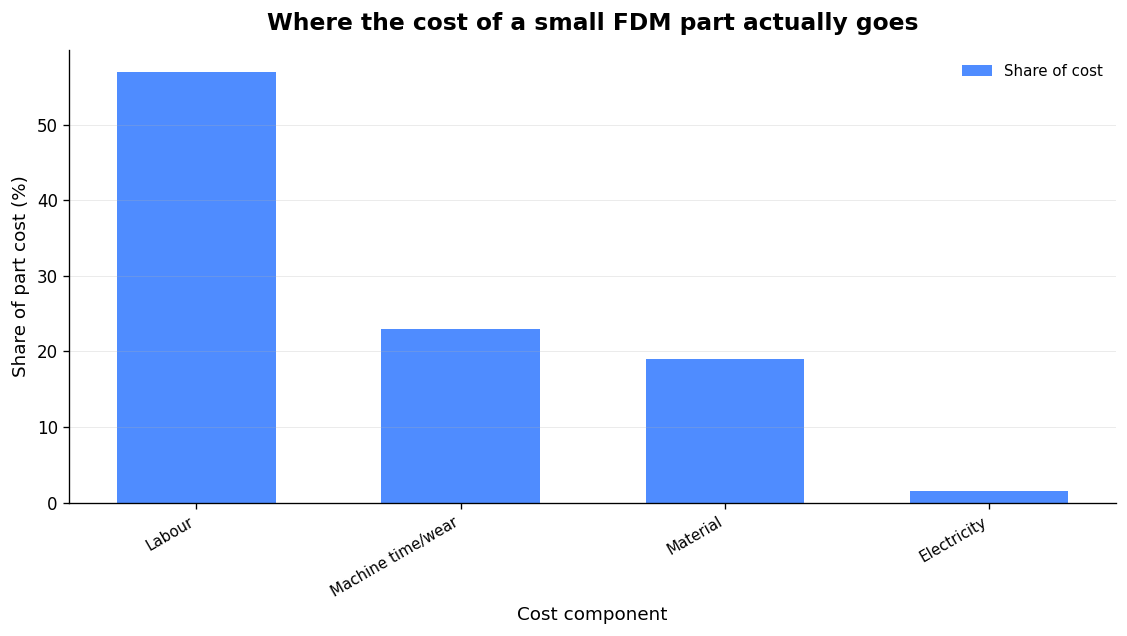
Add your six real costs — filament (grams × cost per gram), machine time and wear, electricity (kWh × rate), a 5–10% failure buffer, hands-on labour and post-processing — then multiply by roughly 2.5–3× for a healthy retail margin. The most common money-losing mistake is pricing only the filament, which is usually your smallest cost. For a typical small FDM collectible the split is striking:
| Cost component | Share of a small FDM part |
|---|---|
| Labour (hands-on time) | 57% |
| Machine time / wear | 23% |
| Material (filament) | 19% |
| Electricity | 1.5% |
Labour and machine wear dominate; filament barely registers. If your order system deducts spool grams as prints run and records a true cost per part — splitting mixed plates by weight — you stop guessing margins. Our full breakdown of 3D print farm cost per part walks through where the money actually goes.
Running it end to end
Put the pieces together and order management stops being admin. In Printer Farm (open beta), shop connectors pull orders in every 10 minutes and match them to part numbers by SKU — WooCommerce in one click with a read-only key, Shopify, or your own custom website connected through the farm’s shop API (a token, no plugin). Stock is used first; one click raises a works order for exactly the shortfall, carrying the due date and customer reference. The Cloud Slicer in the browser — the real OrcaSlicer engine, with full Printer/Filament/Process presets and STEP conversion — slices on your own PC, or plates arrive from ATN Slicer as revisions. The queue dispatches each job to the first free compatible printer with the right filament loaded; cameras with AI failure alerts watch it; good prints bank into stock with a true cost per part; and at despatch you raise a numbered delivery note.
It works with Creality and any Klipper/Moonraker printer, Bambu Lab in LAN mode, FlashForge, OctoPrint, PrusaLink and Duet. It needs a small agent on a Windows or Linux computer that stays on; your files stay on your own machine. If you sell on Etsy or eBay specifically, the workflow in our farm software for Etsy sellers guide maps the whole thing to a marketplace backlog.
FAQ
What’s the difference between print farm order management and fleet monitoring?
Monitoring watches the printers — status, temperatures, cameras, failure detection. Order management watches the work — it links each sold order to a SKU, a file and a due date, tracks it through production, and tells you what’s late and what’s ready to ship. You want both, but order management is the layer that connects the sale to the first layer.
What should go in a SKU, and what shouldn’t?
The SKU code should be short, unique, stable and readable, and should identify one sellable variant. Keep price, supplier, shelf location, printer assignment and the current file revision out of the code and in a separate record. Mint a new SKU only when a buyer or operator must distinguish variants — not for a file cleanup or slicer change. An unmapped SKU is a stop condition: hold, never guess a similarly named file.
Does Etsy processing time include shipping transit?
No. Processing time is how long you need to prepare the order before handing it to the carrier; it excludes transit. On multi-item orders the dispatch-by date follows the longest applicable processing time. Etsy changes how this is calculated from time to time, so verify the current mechanics directly.
How should I price a printed part so I don’t lose money?
Add all six real costs — material, machine time/wear, electricity, a 5–10% failure buffer, labour and post-processing — then multiply by about 2.5–3×. Pricing filament alone is the classic mistake; for small parts, labour is around 57% of the cost and filament only about 19%.
Related: Klipper Fleet Management: How to Run Several Klipper Printers Without Babysitting Them