3D print farm profitability comes down to one number most people never calculate: realised revenue per machine-hour. Not the sticker price of a printer, not how many machines you own — the cash each printer actually banks for every hour it is meant to be running. A small farm typically realises somewhere between £8 and £12 per printer-hour. Everything else in this article is about protecting that figure from the three things that quietly destroy it: idle time, failed prints and uncosted labour.
The headline figures are genuinely attractive when a farm is run with discipline. A five-printer Bambu farm at around 70% utilisation can clear £2,000–£3,500 a month in profit in a good niche; full-time operations selling their own original designs can clear £2,000–£7,000 a month net. But the same category of business, run as a commodity shop chasing £0.06/g orders against online aggregators, routinely nets under 5% after power, filament, scrap and depreciation. The hardware is identical. The economics are not.
Where the money actually comes from: margins by business model
Gross margins on the better product categories run 60–85%. The number that pays your rent, though, is net margin after fees, electricity, depreciation and — critically — your own time. Model that properly and net lands in the 12–40% range, with a disciplined, well-chosen farm settling around 40–55%.
Two warnings sit on either side of that range. First, if your spreadsheet shows above 80% net margin, you have forgotten to pay yourself for design and handling. Second, a generalist farm with no defensible niche frequently sits at breakeven once you subtract machine depreciation and failed-print waste. The operators comfortably holding 10–18%+ net are the ones with something hard to copy: dental models, aerospace prototyping, production fixtures, original designs with a following.
The clearest illustration of why the business model matters more than the hardware: around four to six well-utilised printers can clear roughly $10,000 a month on consumer products — but three machines can match that selling business prototyping at $100+ per design-hour. At that point you are selling expertise, not grams of filament, and the machine count almost stops mattering.
The cost stack — and the layers people leave out
Material and electricity are the cheapest, most visible costs, which is exactly why they mislead people. A print might burn £1.00 of filament and £0.10 of power and look like pure profit. It isn’t. There are four cost layers you have to model before you quote anything:
- Material: (grams ÷ 1000) × cost per kg × (1 + failure rate). The failure multiplier is not optional.
- Electricity: (printer watts ÷ 1000) × print hours × cost per kWh. An FDM machine pulling ~180 W is a small line item; it still has to be in the model.
- Depreciation: (printer cost ÷ lifetime hours) × print hours. Spreading a $350 machine over 2,000 lifetime hours adds about $0.53 to a 3-hour print — small per job, real over a year.
- Labour, packaging, platform fees: setup, removal, QC and packing run 5–15 minutes per print at £12–15/hr; packaging is roughly £0.30–£0.80 a unit; then the marketplace takes its cut of the sale price.
Labour is the one that reorders everyone’s assumptions. A sensible pricing discipline is to multiply total cost (materials + electricity + depreciation + labour) by 2.5–4×, then add a further 5–10% to cover maintenance and failed prints. If you price at 2× and skip the labour line, you are paying customers to take your parts.
| Cost layer | Typical figure | Why it bites |
|---|---|---|
| Material (per print) | grams × £/kg × (1 + failure rate) | Underpriced when the failure multiplier is dropped |
| Electricity | ~180 W machine, local £/kWh | Small, but idle standby still draws power |
| Depreciation | ~$0.53 on a 3-hour print ($350 / 2,000 h) | Invisible until the printer needs replacing |
| Labour | 5–15 min/print @ £12–15/hr | The single most-forgotten cost |
| Packaging | £0.30–£0.80/unit | Erodes margin on low-ticket items |
| Failure buffer | +5–10% of total unit cost | Protects your baseline quote |
Why a farm beats a single printer: batch economics
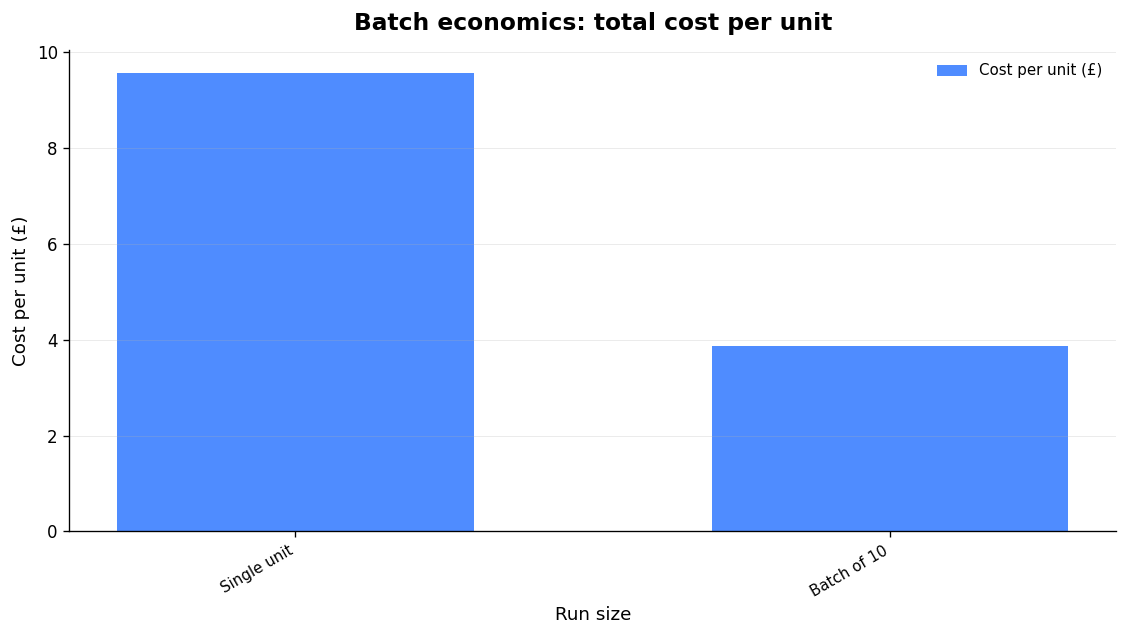
The reason a print farm is a different business from a hobby printer is labour amortisation, not raw throughput. Take one worked model: a single unit costs £9.56 all-in; the same part in a batch of ten costs £3.86 per unit. The material and machine time per part barely move — what collapses is the per-unit labour, by 60–80%, because you set up, remove, QC and pack ten parts in roughly the time one used to take.
That is the entire economic argument for a farm. It is also why queueing and bed-clearing discipline matter so much: the batch only pays off if the machines are genuinely busy while you are doing the handling.
Utilisation: the number that actually drives profit
A farm earns on machine-hours, so utilisation is the metric that decides whether you are profitable or just busy. A printer running 16–20 hours a day at a low scrap rate makes money; the same printer idle half the day is a depreciating asset consuming floor space and standby power.
Be honest about what utilisation means. It is not “70% of the day the nozzle is hot”. It is 70% of the time you intended the machine to be printing, useful parts are actually being made. A plate that finishes at 02:00 and sits done until you walk in at 09:00 is seven hours of utilisation you planned for and lost. This is precisely where a queue that dispatches the next job to the first free compatible printer earns its keep — and why farm owners obsess over clearing beds between jobs rather than over print speed.
Scrap rate: the silent margin killer
Failure rate compounds through your whole cost stack, because a failed print pays for filament and machine time with nothing to sell. Model it explicitly:
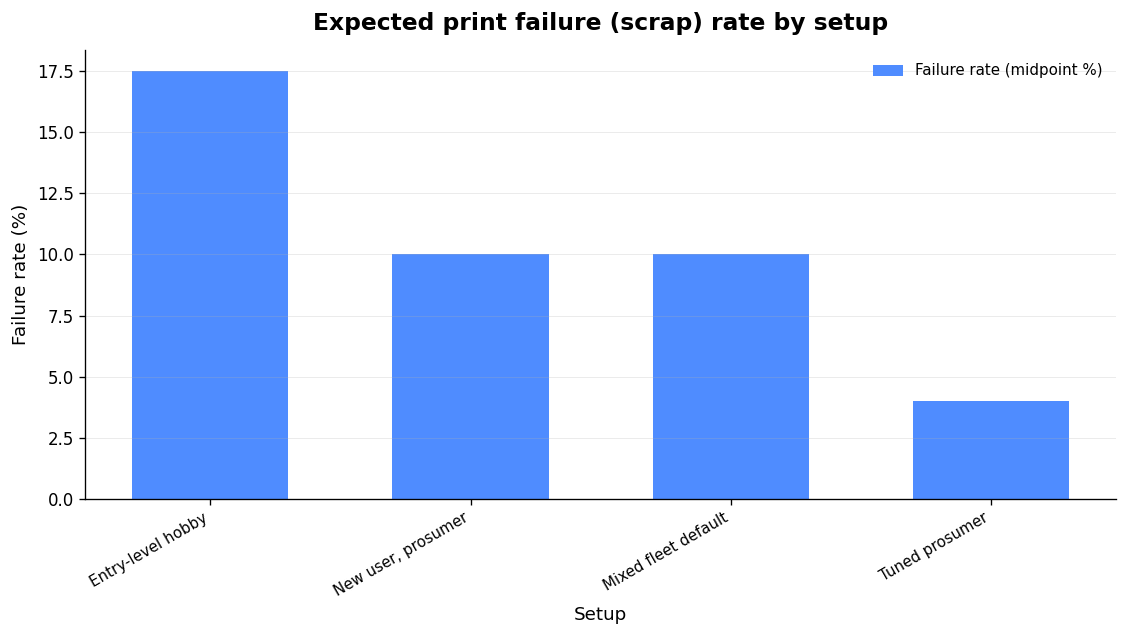
| Setup | Expected failure rate |
|---|---|
| Entry-level hobby printers | 15–20% |
| New users, prosumer machines | 8–12% |
| Mixed small fleet (planning default) | ~10% |
| Tuned prosumer (P1S, MK4, Voron 2.4) | 3–5% |
A 10% failure rate means one job in ten is pure loss. And failures are not equal: a 14-hour print that dies at hour 13 cost you a full plate of filament plus machine time you can never resell. Moving from a 12% to a 4% scrap rate on a busy fleet is often a larger profit swing than buying another printer.
That is why catching a failure early, rather than discovering it at the removal stage, is a direct margin lever. Camera-based vision AI failure detection stops the dead print at hour one instead of hour thirteen, and catching warp or heat-soak before you commit a long plate removes the failure entirely. If you are still chasing recurring defects by eye, our defect identifier and the Diagnose tool name the fault and give you the slicer change.
Startup cost and realistic payback
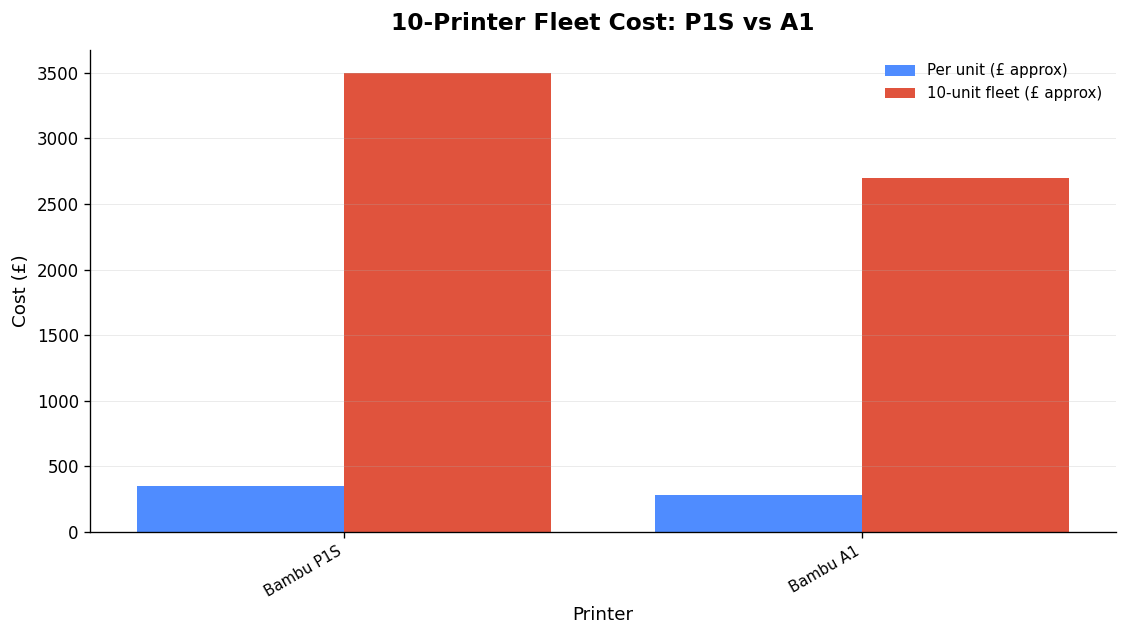
Startup scales in clear tiers. One printer to validate a product is $400–$900. Two to three machines is roughly $1,800–$2,800. Five to ten — the point where you add a spare-parts pool, a dedicated circuit and fleet software — is $4,000–$10,000. A UK five-printer starter can be built for about £1,800–£2,100, and a ten-machine P1S fleet with shelving, power and initial filament lands near $5,300.
Payback on an individual printer is fast — often 2–5 months on a $700 machine — but the business breaks even more slowly once premises and your time are in the mix: typically 12–24 months for a small home-based setup ($5k–$15k) and 24–36 months for a commercial shop with $40k–$60k in equipment and a lease. Ignore any marketing figure promising sub-one-month payback: those assume 100% sell-through at full retail with zero marketing cost, which is not a real business.
Hardware economics: the P1S is the default for a reason
Bambu Lab machines have become the default for new farms because the X1C, P1S and A1 family deliver speed and reliability that consumer gear simply didn’t a few years ago. For PLA and PETG consumer products — the bread and butter of Etsy and Shopify sellers — the P1S hits the return-on-investment sweet spot.
The sharpest point is depreciation. The P1S lists at $699 but regularly sells for $399–$499, which roughly halves your per-hour depreciation. Against the X1C, both machines run the same volumetric flow (~21–24 mm³/s on standard hotends), so the cheaper P1S saves about $0.20 per operating hour in capital cost — around $600 extra profit per machine over 3,000 farm hours. Buy the machine that outputs the same parts for less capital, and let the X1C earn its place only where its extra features actually sell work. The newer P2S (released October 2025) adds a touchscreen, a stronger extruder and onboard AI vision, and is pitched squarely at professional and farm use if you want that on new purchases.
Turning the model into a system that runs itself
Every lever above — utilisation, scrap rate, true cost per part, batch labour — is an operations problem, not a spreadsheet problem. That is what Printer Farm is built to run, end to end: a web order from WooCommerce, Shopify or your own custom website (connected through the farm’s shop API — a token, no plugin) pulls in; stock is used first and one click raises a works order for exactly the shortfall; the job is sliced in the browser on the real OrcaSlicer engine or arrives as a revision from ATN Slicer; the queue dispatches it to the first free compatible printer with the right filament loaded; cameras with AI failure alerts watch the plate; good prints bank into stock with a true, spool-deducted cost per part (mixed plates split by weight); and despatch raises a numbered delivery note. You confirm the bed is clear and press Despatch — the rest is automatic.
It works with Creality and any Klipper/Moonraker printer, Bambu Lab in LAN mode, FlashForge, OctoPrint, PrusaLink and Duet. A small agent runs on a Windows or Linux computer that stays on; your files stay on your own machine. There’s a free 14-day trial (no card). For the deeper operational detail, see our guides on running a production line and cost per part.
FAQ
Is a 3D print farm actually profitable?
Yes, for operators with a defensible niche and disciplined costing — net margins of 40–55% are realistic, and a five-printer Bambu farm at ~70% utilisation can clear £2,000–£3,500 a month. Generalist farms chasing commodity prices against aggregators routinely run near breakeven once depreciation and scrap are counted. The difference is the business model, not the machines.
What is a good profit margin for a print farm?
Gross margins of 60–85% on the better categories; net margins of 40–55% once you pay yourself for design and handling, apply real shipping and payment fees, and use an honest failure rate. If you’re seeing above 80% net, you’ve almost certainly left your own labour out of the model.
How many printers do I need to make a living?
Roughly four to six well-utilised machines can clear around $10,000/month on consumer products — but three can match that if you sell business prototyping at $100+ per design-hour. Utilisation and niche matter far more than raw machine count.
What kills print farm profitability fastest?
Idle machines and failed prints. A printer running 16–20 hours a day earns; the same machine idle half the day is a liability. And a 10% scrap rate means one job in ten pays for filament and machine time with nothing to sell — moving from 12% to 4% scrap is often a bigger profit swing than buying another printer.